
Google SERP Simulator
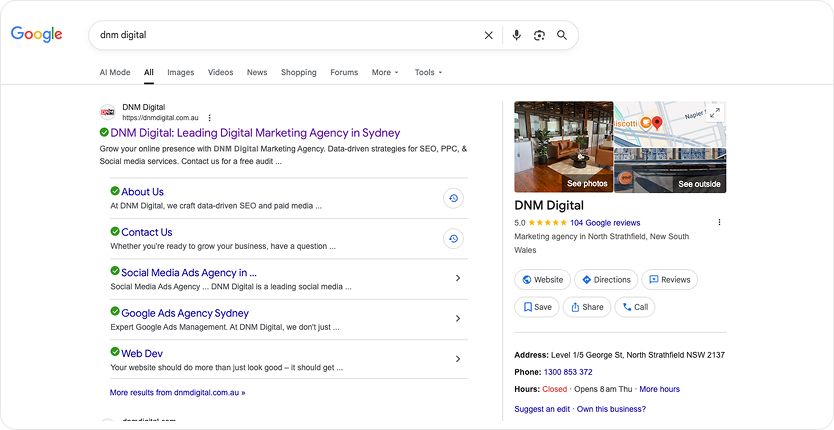
Preview exactly how your page title and meta description will appear in Google search results. Optimise for clicks before you publish.

 102 Reviews
Why Your SERP Snippet Actually Matters
Most SEOs spend hours on content and thirty seconds on the snippet. That’s backwards.
Your title tag and meta description are the first things a real person sees. Before they read a single word you wrote, before they know your brand exists, they see that snippet sitting in a list of ten results. It either earns the click, or it doesn’t.
Google truncates titles around 60 characters and meta descriptions around 160 characters. Go over and your copy gets cut mid-sentence with an ellipsis. Go under, and you’re leaving valuable search real estate on the table.
This tool shows you the exact preview so you’re not guessing.
Ready to learn more?
How to Write a Title Tag That Gets Clicked
A title tag is not a filing label for your page. It’s a headline. It needs to do the same job a great headline does: stop the scroll, communicate value, create enough curiosity to earn the next step.
A few things that actually work:
Google bolds matching terms in the results. If someone searches “best accountant Melbourne” and your keyword appears in the first three words, it jumps out immediately.
If someone searches for an informational query, they want an answer. If they search for a transactional query, they want a page that does something. Your title should signal you’ve got what they’re actually looking for.
Keyword stuffing your title tag reads as spam to real people. One clear keyword, one compelling angle, that’s the formula.
Use numbers where they’re natural. “7 Ways to…” or “2026 Guide to…” signal specific, structured content. They set expectations, and they convert.


Ready to hit the mark?
Let’s get started!
Ready to take your business to the next level? Let DNM Digital’s expert team create a tailored strategy that drives results. Contact us today and start seeing real, measurable growth!
