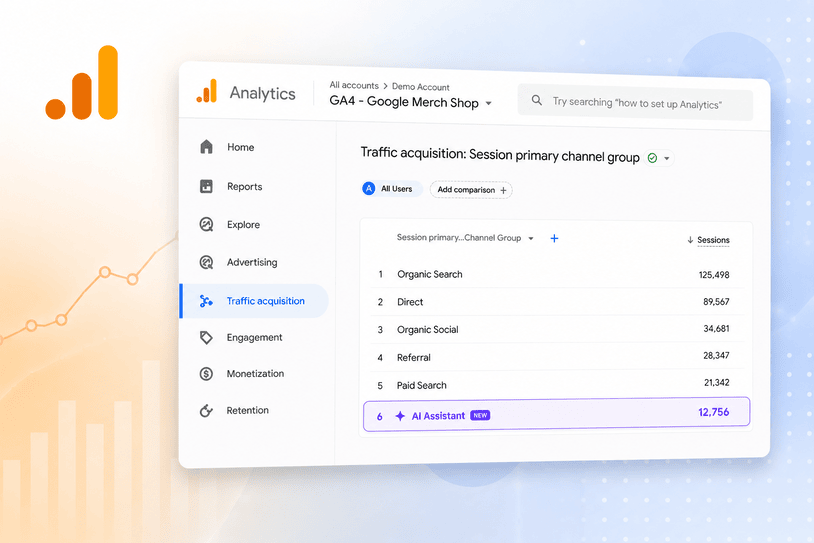
On May 13, 2026, Google quietly added something marketers have been asking for: a dedicated AI traffic channel in GA4. No setup required. It appeared automatically in your Default Channel Group reports and started bucketing visits from ChatGPT, Gemini, Deepseek, Copilot, and Grok into a single channel called AI Assistant.
For the first time, you can open GA4 and see exactly how much traffic is coming from AI chatbots, how those visitors behave, and whether they convert.
It is genuinely useful. And it is missing the most important slice of AI traffic in your account.
What the GA4 AI Assistant Channel Actually Tracks
When a user clicks a link from ChatGPT, Gemini, or another recognised AI assistant and lands on your site, GA4 now tags that session automatically. The channel shows up as AI Assistant in your Default Channel Group. The medium is tagged as ai-assistant and the campaign as (ai-assistant).
You do not need to do anything. It is retroactive from May 13, 2026 only. Any AI traffic that came through before that date is still buried in your Referral or Direct channel and will not be reclassified.
To find it, go to Reports, then Acquisition, then Traffic Acquisition. Look for AI Assistant in the Default Channel Group column. If you are not seeing it yet, it was still rolling out to properties through early June 2026, so check back if it has not appeared.
Early data from studies of B2B tech firms shows AI-referred visitors converting at more than five times the rate of standard organic search traffic. That alone is reason enough to pay attention to this channel, even if the numbers look small right now.
The Catch Nobody Is Talking About
Here is the problem. Google’s own AI traffic does not appear in the AI Assistant channel at all.
When someone uses Google’s AI Overviews or AI Mode to research a product, clicks a link, and lands on your site, that visit is tagged as Organic Search. Not AI Assistant. Not a new channel. Just regular old organic, the same as a click from a ten-year-old blue link.
This matters because Google AI Overviews now appear on the majority of commercial search queries. The AI traffic coming from Google is almost certainly larger than the traffic coming from ChatGPT or Gemini combined, and none of it is showing up in your shiny new AI Assistant channel.
There is a second problem on top of that. A significant share of AI chatbot traffic never carries a referrer header at all. In-app browsers, native mobile apps, and copy-pasted links strip the referrer entirely. GA4 cannot tag what it cannot read. Those sessions end up in Direct, not AI Assistant.
So the number you see in your AI Assistant channel is real. It is just not the full picture. The same rule applies here as everywhere else in analytics: the number in the report is not the same as the number that actually happened.
What Your AI Traffic Data Is Actually Telling You
Think of the AI Assistant channel as a floor, not a ceiling. The real volume of AI-influenced visits is higher. How much higher depends on your audience, your device mix, and how often your brand appears in AI-generated answers.
What the channel does give you clearly:
- Which AI platforms send traffic: ChatGPT vs Gemini vs Copilot, broken down by source
- Conversion behaviour: do AI-referred visitors buy, enquire, or bounce
- Landing page performance: which pages AI assistants are linking to most
- Trend direction: is AI referral traffic growing month on month in your account
What it does not tell you: how many people found you through a Google AI Overview, how many AI-influenced visits came through mobile apps, or what percentage of your Direct traffic is actually untagged AI referral.
If you want to get a more complete picture, your data and analytics setup needs to account for the gap, not just the channel GA4 serves you by default.
Three Things to Do With This Data Right Now
1. Check Your AI Assistant Channel This Week
Open GA4, go to Traffic Acquisition, and filter by AI Assistant. Note the volume, the top landing pages, and the conversion rate compared to your Organic Search channel. If AI traffic is converting better, that tells you something important about where your highest-intent visitors are coming from right now.
2. Do Not Benchmark Against Industry Numbers
Every report coming out right now is quoting average AI traffic percentages across broad industry categories. Your number will be different. What matters is your trend, your conversion rate, and whether the channel is growing. Use your own data as the baseline and measure month on month from June 2026 forward.
3. Start Treating AI Visibility Like SEO
If AI assistants are sending traffic to your site, it means your brand or content is appearing in AI-generated answers. That is not an accident and it is not automatic. It is the result of having clear, authoritative, well-structured content that AI models trust enough to cite. The same principles that drive AI SEO also drive AI referral traffic. The two are connected.
If your conversion rate from AI traffic is low, that is a separate problem. AI assistants can send highly qualified visitors. What happens after the click is on your site, not the channel.
The Bottom Line
GA4’s AI Assistant channel is a genuine step forward. For the first time you can see AI chatbot traffic as its own channel, benchmark it separately, and make decisions based on real data rather than guesswork.
But it is a partial view. Google’s own AI traffic is invisible to it. Mobile referral gaps mean the real volume is higher than the report shows. And any data before May 13, 2026 is gone.
Use the channel as a signal, not a source of truth. Watch the trend. Compare conversion rates. And make sure your analytics setup is built to capture what GA4 misses by default.
If you want to know what your AI traffic picture actually looks like across all channels, we can help you map it properly.